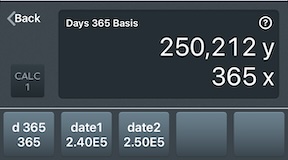
Days 365 Calculator
Calculates the number of days between date1 and date2, using the 365-day calendar, ignoring leap years.
Example
Find the number of days between February 12, 2024 and February 12, 2025 using the 365 day calendar.
| Value |
Keystroke |
Display |
Description |
| 240212 |
date1 |
240,212 |
Stores Feb 12, 2024 in YYYYMMDD format. |
| 250212 |
date2 |
250,212 |
Stores Feb 12, 2025 in YYYYMMDD format. |
|
d 365 |
365 |
Calculates the number of days using a 365 day calendar. |
Since the paramaters are dates, this is not used for solving or plotting.
The History Detail
The History Details will display the dates as a local string with the day of the week and month.
Days 365 Basis
        240,212 : Date 1: Mon Feb 12 2024
        250,212 : Date 2: Wed Feb 12 2025
        240,212 : The starting date YYYYMMDD.
        250,212 : The ending date YYYYMMDD.
            365 : The 365 days, ignoring leap days.
Result:	 365
Date Entry
CALC 1 uses the ISO 8601 YYYYMMDD format for entering dates. This is a common date format that most users around the world are familiar with.
For example, April 28, 2004 is entered as 40428. June 4, 2018 is entered as 180604.
Date Entry Shortcuts
If you omit the first two years (the century) of YYYY, CALC 1 will use the current century, 20. This is a common truncated representation.
If you omit the entire YYYY, CALC 1 will use the current year.
Reference:
365-day calendar - Wikipedia