solve(x,y) key Example
This page contains examples for the "solve(x,y)" key found on many calculators.
This key solve expression using "rgx".
The key only appears in the ALG
calculation mode since it uses an algebraic expression.
Solving using the "solve(x,y)" key.
The "solve(x,y)" key will solve for the rgx value that results in the goal value entered given a starting value for rgx.
For the expression:
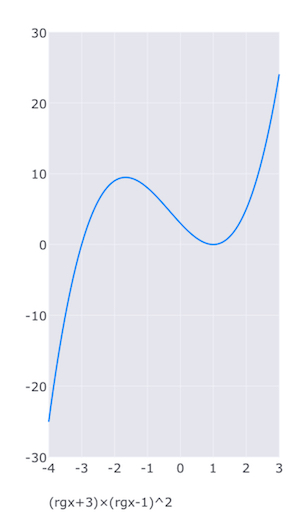
(rgx+3)×(rgx-1)^2
for what values of rgx gives a result of 5?
| Value | Keystrokes | Display | Description |
|---|---|---|---|
| C | Clears the expression. | ||
| (rgx+3)×(rgx-1)^2 | Enter the expression to solve. | ||
| K | Enters K mode. | ||
| 5 | shift ENTER | 5.00 | Enters the goal value. |
| 3 |
shift solve(x,y) | 2.00 | Solves for the value of rgx that gives a result of 5 nearest 3. |
| = | 5.00 |
Verifies that a value of rgx of 2 results in 5. | |
| Find the other values of rgx that result in 5. See plot
below. |
|||
| 5 | shift ENTER | 5.00 | Enters the goal value. |
| 0 |
shift solve(x,y) | -0.382 |
Solves for the value of rgx that gives a result of 5 nearest 0. |
| = | 5.00 |
Verifies that a value of rgx results in 5. | |
| 5 | shift ENTER | 5.00 | Enters the goal value. |
| -3 |
shift solve(x,y) | -2.62 |
Solves for the value of rgx that gives a result of 5 nearest -3. |
| = | 5.00 |
Verifies that a value of rgx results in 5. |
By plotting the expression using the plot(x,y) key you can see the approximate values.